


TDCJ Video Visitation
By entering the visit, you are agreeing that the visit may be monitored or recorded, and that you will abide by all TDCJ visitation rules and regulations.
Please enter the requested information below then select continue.
Help for Apple devices
After you enter your name and select the continue button, you will be presented with the following screen:

In the yellow highlighted part of the page, scroll down and you will see:

If you've already downloaded and installed the Jitsi Meet app, tap the number 1 blue "Join this meeting using the app" button. If you would like to download the app from the app store, tap the number 2 blue "Download the app" button.
Or you can tap the number 3 blue "Launch in web" to use your Safari, Chrome or Firefox internet browser.
Go back to start the visit
After you enter your name and select the continue button, you will be presented with the following screen:
In the yellow highlighted part of the page, scroll down and you will see:
If you've already downloaded and installed the Jitsi Meet app, tap the number 1 blue "Join this meeting using the app" button. If you would like to download the app from the app store, tap the number 2 blue "Download the app" button.
Or you can tap the number 3 blue "Launch in web" to use your Safari, Chrome or Firefox internet browser.
Go back to start the visit
Help for Android devices
After you enter your name and select the continue button, you will be presented with the following screen:
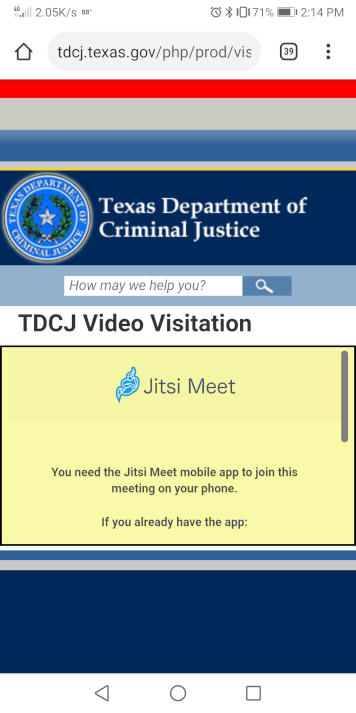
In the yellow highlighted part of the page, scroll down and you will see:

If you've already downloaded and installed the Jitsi Meet app, tap the number 1 blue "Join this meeting using the app" button. If you would like to download the app from the app store, tap the number 2 blue "Download the app" button.
Or you can tap the number 3 blue "Launch in web" to use your Chrome, Edge or Firefox internet browser.
Go back to start the visit
After you enter your name and select the continue button, you will be presented with the following screen:
In the yellow highlighted part of the page, scroll down and you will see:
If you've already downloaded and installed the Jitsi Meet app, tap the number 1 blue "Join this meeting using the app" button. If you would like to download the app from the app store, tap the number 2 blue "Download the app" button.
Or you can tap the number 3 blue "Launch in web" to use your Chrome, Edge or Firefox internet browser.
Go back to start the visit